Quick answer
How do I rank products without ads?
Start by listing your products for free in Google Merchant Center, so they can show in the Shopping tab and other Google surfaces. Then make every important product page answer the buyer's questions (size, materials, fit, delivery), add product markup that matches your feed, and earn genuine reviews. Expect it to take months, not days. Nobody can promise a top spot.
Key takeaways
- Google shows products for free in the Shopping tab, Search, Images and more. Plenty of stores never switch it on.
- Shoppers leave when a product page can't answer them. The same details help you rank.
- AI shopping tools read product feeds and markup. Accurate data is your ticket in.
- Organic traffic is slower to start than ads. It also doesn't stop when the budget does.
What are your ads really costing per order?
Put in last month's numbers from your ads account. You'll see what each paid order costs you, and what you'd keep if more sales came from free listings and organic search.
Let's be straight about "without ads." Organic traffic doesn't cost you per click, but it does cost time: rewriting pages, fixing data, asking for reviews. The payoff is slower and it lasts. A product page you improve this month can still be selling next year, long after an ad campaign would have burned through its budget. Below are the steps we'd take with a small online store, roughly in order.
1. Why paying for every click keeps getting harder
Clicks aren't getting cheaper. WordStream by LocaliQ looked at more than 16,000 US search campaigns for its 2025 Google Ads benchmarks and found the average cost per click hit $5.26, up almost 13% on the year before. So each sale you buy costs a little more than last year's did.
Organic results are changing too. One study by GrowthSRC Media, covering more than 200,000 keywords, found the top organic result's click-through rate fell from 28% to 19% as Google rolled out AI Overviews. Ranking first in the blue links is still worth a lot. It just isn't the only spot that matters now. Free product listings and AI answers are where a growing share of shoppers start.
| Paid ads | Organic | |
|---|---|---|
| How fast | Traffic from day one | Usually builds over a few months |
| What you pay | Every single click | Your time, or an expert's, up front |
| When you stop | Traffic stops that day | Pages and listings keep working |
| Where you show | Slots labeled "Sponsored" | Free listings, product results, AI answers |
| Best for | Launches, sales, testing a product | Steady sales from your core range |
We're not saying ads are bad. They're great for a launch or a holiday sale. The goal is to stop needing them for every order.
2. Get your products into Google's free listings
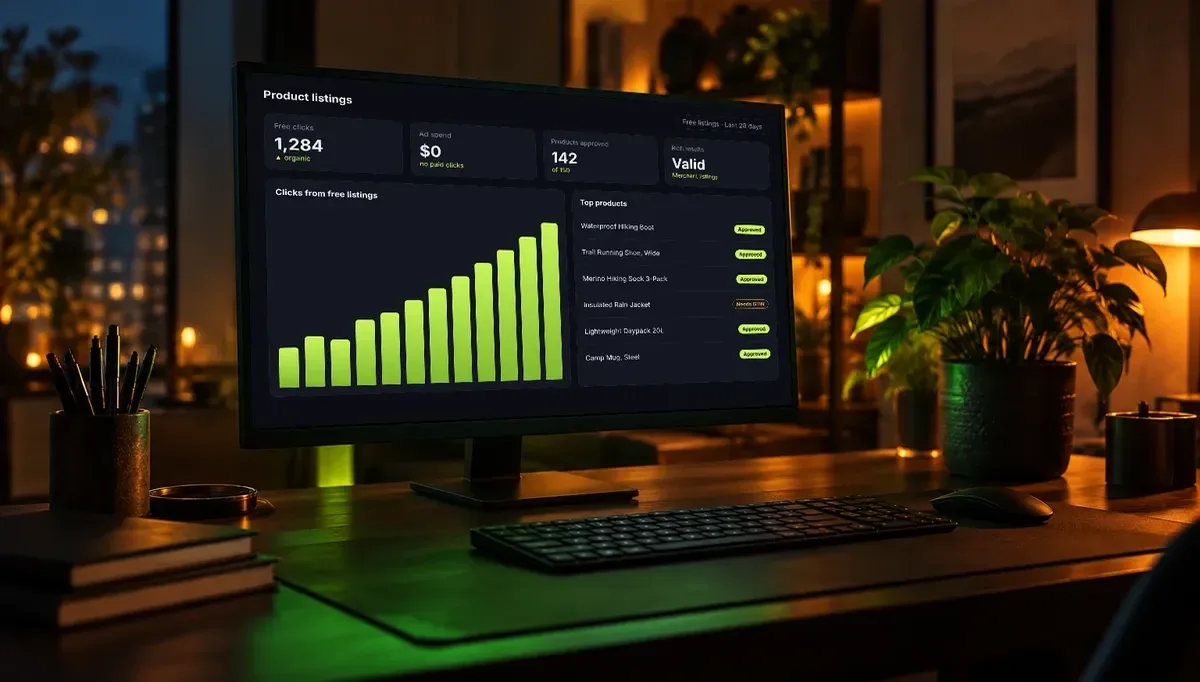
This is the step most stores skip, and it's free. Google Merchant Center lets your products appear without paying in the Shopping tab, in Search results with price and stock, in Images and Lens, and on YouTube, Maps, Gemini and your Business Profile in supported countries.
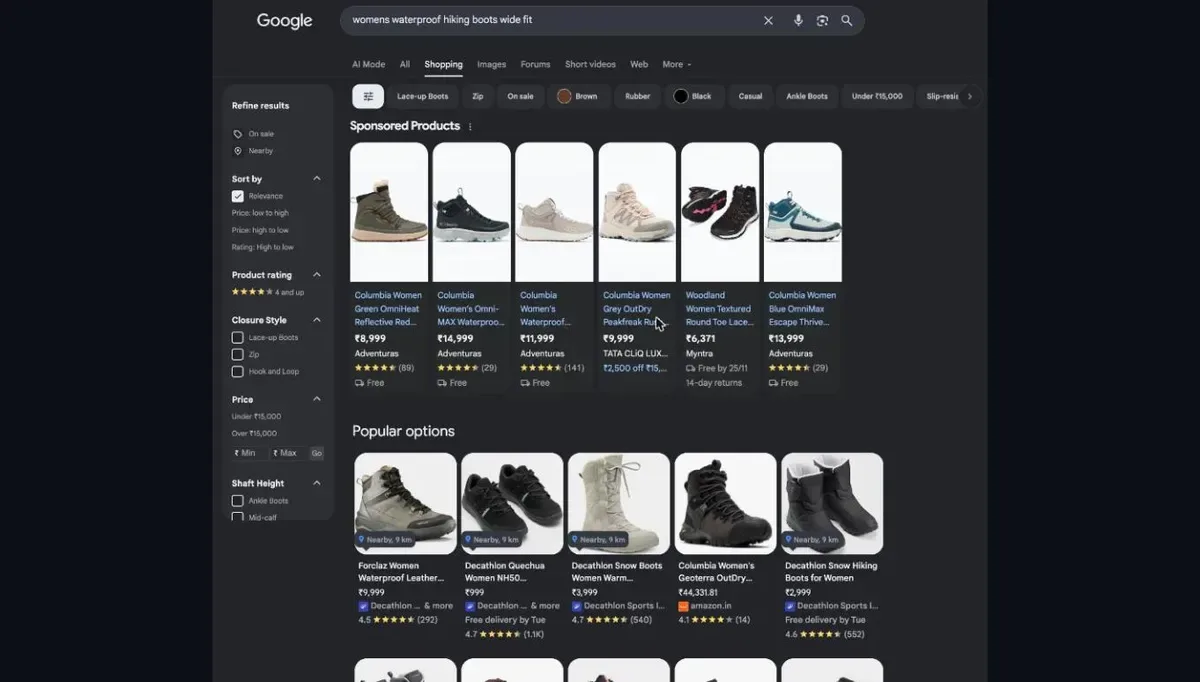 A real Shopping tab search. The top row is paid. Everything under "Popular options" is free listings, from stores that sent Google their product data.
Look at that search above. The first row is labeled "Sponsored Products," and those stores paid for every click. The bigger grid below is free. In this search, four of the five products in that first free row come from Decathlon, and it pays nothing for those clicks.
Getting in takes an afternoon for a small catalog:
- Open a Merchant Center account. New accounts are opted into free listings by default.
- Add your products. Google needs an ID, title, description, link, image, price, availability and brand. Add a GTIN (the barcode number) or MPN wherever one exists.
- Set up shipping and returns in Merchant Center. Both are required in the US, UK, most of Europe and several other markets.
- Clear the "Needs attention" list on the Products page.
- Check the Performance page each month and filter by free listings.
On Shopify or WooCommerce, the official Google app keeps your catalog in sync for you. One honest caveat: Google says approval makes you eligible, not guaranteed. Clean, complete data is what gets you shown. Rather have someone do it? Our e-commerce team sets up Merchant Center as part of every store build.
How to fix it
In Merchant Center, go to Products, then "Needs attention." Sort by the number of products affected and fix the top issue first. Missing GTINs and prices that don't match your site are the usual suspects.
3. Make every product page answer the buyer
Picture a shopper who needs to know if a boot fits wide feet. The page doesn't say. They scroll, check the photos, read the reviews, and then leave for a store that does say. Baymard Institute has watched this happen in its usability testing: people who can't find key details spend one to three minutes hunting, then often give up on the product or the site. In its beauty tests, half of users wanted ingredient lists and quickly dropped products that didn't show them.
The fix helps you twice. A page that answers buyers converts better, and those same specific details are what Google and AI tools match to specific searches.
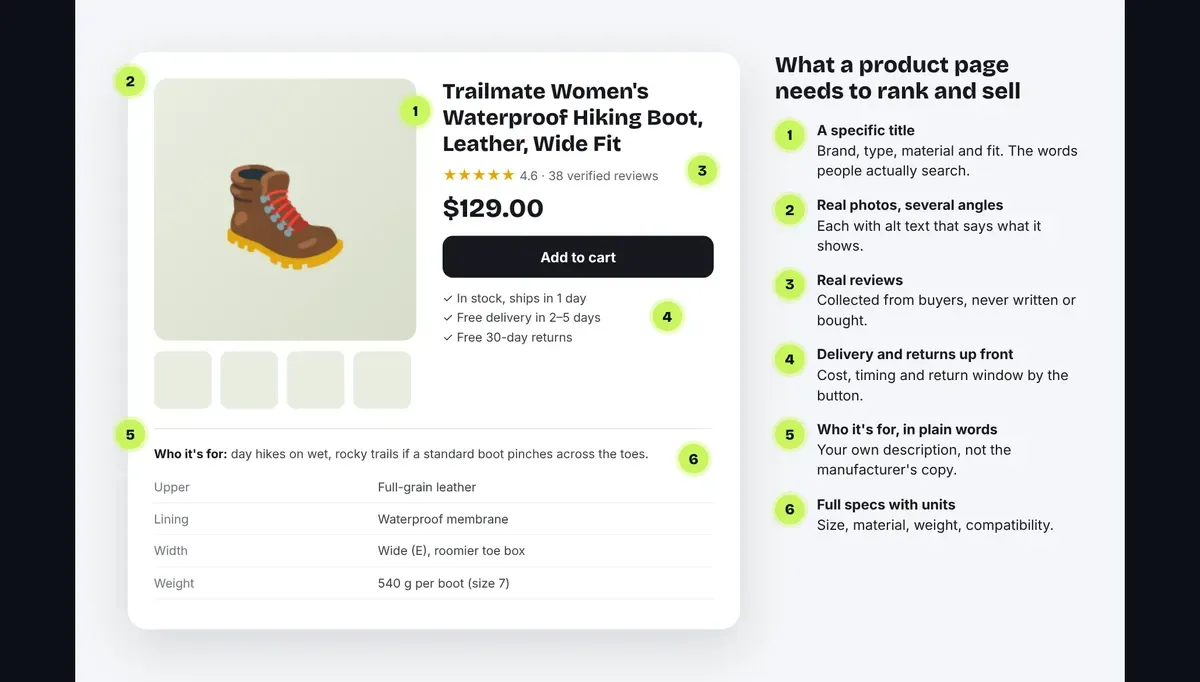 Six things every important product page should have. The product is an example, not a real listing.
- A title people actually search. "Women's Waterproof Hiking Boot, Leather, Wide Fit" tells Google and buyers far more than "Trail Pro 2."
- Your own description. The manufacturer's text is on hundreds of other sites. Say who it's for, how it's used and how it differs from similar items.
- Full specs with units. Size, material, weight, compatibility, what's in the box.
- Real photos from several angles, each with alt text describing what's in it.
- Delivery and returns by the button. Cost, timing and the return window.
- Genuine reviews (more on that in section 6).
How to fix it
Don't try to rewrite 2,000 products at once. Pull your top 20 sellers from your sales report and fix those first. Then work through the next 20 each month.
4. Add product markup, then test it
Structured data is a block of code that spells out the facts on your page: name, price, stock, rating, shipping, returns. Google describes two kinds for products. Merchant listing markup is for pages where people buy from you directly. Product snippet markup is for pages that review or compare products without selling them.
Two things from Google's own documentation are worth knowing:
- Use markup and a Merchant Center feed together. Google says doing both improves eligibility and helps it check your data.
- Rich results are never guaranteed. Markup makes you eligible. Google decides when to show stars, prices and shipping.
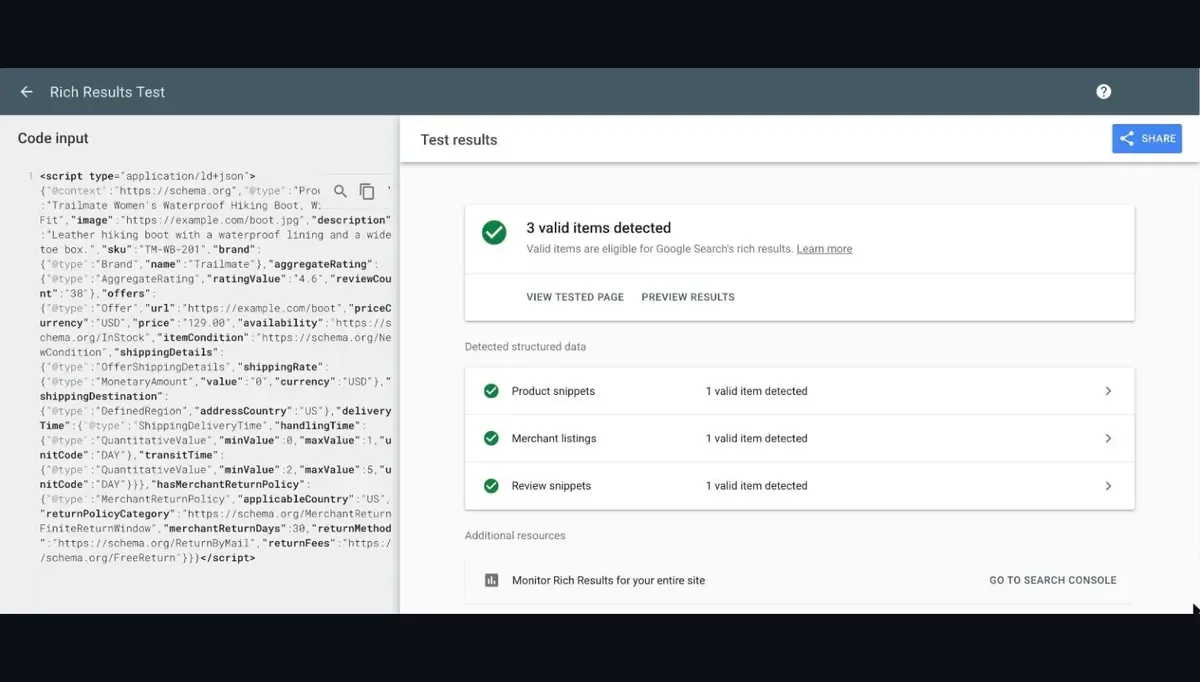 We ran sample product markup through Google's Rich Results Test. All three product features came back valid. Run yours the same way.
Most Shopify and WooCommerce themes add basic markup already, but "basic" often means no shipping or returns info. Paste a product URL into the Rich Results Test and look for Merchant listings in the results. If it's missing or full of warnings, that's your job for the week.
How to fix it
Test three products: a best seller, a product with variants, and one that's out of stock. Make sure the price and stock in the markup match the page and your Merchant Center feed. Mismatches are a common reason products get disapproved.
5. Win the specific searches first
"Running shoes" belongs to Nike, Amazon and every big retailer. You probably won't win it this year. But "women's trail running shoes for wide feet" or "replacement filter for [your model]" are searches made by people who know what they want. They're easier to rank for, and they buy.
- Product pages go after exact product, model and attribute searches.
- Category pages go after the broader type. Add a short intro that helps people choose. A bare grid of products gives Google very little to work with.
- Buying guides and comparisons answer "best X for Y" and "X vs Y" questions, then link to the products they mention.
Link it all together: guides point to categories, categories to products, and each product page shows related items and accessories. Google's ecommerce guidance says this kind of structure helps it understand which pages matter most. If your pages get impressions but few visits, our guide on why a website isn't getting traffic walks through the usual causes.
6. Earn reviews the honest way
Reviews help shoppers decide, and they can show as stars on your listings. To show product ratings in Google Shopping, Google asks for at least 50 reviews across your products, sent through a supported review app or directly in Merchant Center.
Google's rules here are strict, and for good reason. Its policies ban paid or otherwise fake reviews, reviews from staff or anyone with a stake in the product, and reviews written by AI. Breaking them can cost you your ratings, or worse.
How to fix it
Send one short email a few days after each order arrives, asking for an honest review with a direct link. Reply to the negative ones too. Shoppers notice how you handle problems.
7. Get found in ChatGPT and Google AI Mode
More shoppers now ask an AI assistant what to buy. These tools don't guess. They pull from product data, so the work in sections 2 to 4 pays off here as well.
Google AI Mode and Gemini draw on Google's Shopping Graph, which Google says holds more than 50 billion product listings, with around 2 billion refreshed every hour. Much of it comes from Merchant Center feeds and store websites. You don't need a separate AI feed. If your free listings are set up and accurate, you're already in the pool.
ChatGPT finds web pages with a crawler called OAI-SearchBot. OpenAI says sites that block it won't appear in ChatGPT search answers. You can still block GPTBot (the crawler for training) if you prefer, because the two are separate. Check your robots.txt includes something like this:
User-agent: OAI-SearchBotAllow: /User-agent: GPTBotDisallow: /
OpenAI also lets merchants apply to submit product feeds at chatgpt.com/merchants. A word of caution, though. OpenAI changed its in-chat checkout in 2026 and started showing ads in ChatGPT, so some shopping results there are now sponsored. Check the current rules before you put a lot of time into any one AI platform.
What you can control is simple: accurate data everywhere (page, markup and feeds agree), real reviews, and other trusted sites mentioning your brand. That's what tends to get products picked. Nobody can guarantee an AI recommendation, and you should be wary of anyone who says otherwise. For the wider picture, read how to get recommended by ChatGPT and AI Overviews, or see our AI search optimization service.
8. Fix the technical basics
Great product pages only rank if Google can reach them and they load quickly.
- Speed. Google recommends a Largest Contentful Paint under 2.5 seconds, Interaction to Next Paint under 200 milliseconds and Cumulative Layout Shift below 0.1. Your Core Web Vitals report in Search Console shows where you stand. Compress images, use WebP, and remove apps you no longer use.
- Filters and sorting. Color, size, price and sort options can spin out thousands of near-identical URLs. Google's guidance on faceted navigation warns these waste crawling. Keep useful filter pages indexable and block or canonicalize the rest.
- Out-of-stock products. Coming back soon? Keep the page live and mark it out of stock. Gone for good? Redirect it to the closest replacement or its category.
- A clean sitemap. List only live, indexable product and category pages, and submit it in Search Console.
9. How long it takes, and what to track
Free listings can start picking up impressions within a few weeks of your feed being approved. Rankings in regular search usually take several months, and longer in crowded niches. Your site's age, how many products you fix and how often you add content all change the pace.
Check these once a month:
- Merchant Center: clicks and impressions from free listings.
- Search Console: clicks and impressions for product and category pages.
- Analytics: organic revenue and conversion rate by landing page.
- Disapproved products: how many, and how fast they get fixed.
What to do this week
- Open Merchant Center and turn on free listings. Clear the top "Needs attention" issue.
- Pick your five best sellers and add full specs, delivery and returns to each page.
- Run one product URL through the Rich Results Test.
- Check your robots.txt doesn't block OAI-SearchBot.
- Set up a review request email for every new order.
None of these needs a developer, and together they'll put you ahead of most small stores.
Frequently asked questions
Free Google listings can start getting impressions within a few weeks of your Merchant Center feed being approved. Rankings in regular search usually take several months, and longer for competitive products. The pace depends on your site's history, how complete your product pages are and how consistently you improve them.
Yes. Google offers free product listings in the Shopping tab, Search, Images, Lens and other surfaces through Merchant Center. Paid Shopping ads are separate. Being approved makes your products eligible to show, but Google doesn't guarantee they will.
Yes, though it takes patience. Free listings are the best place to start, because they rely on your product data rather than years of site history. Then build detailed product and category pages, go after specific searches and collect genuine reviews.
Genuine reviews help shoppers decide and can show as star ratings on your listings. Google needs at least 50 reviews across your products before it shows product ratings in Shopping. Reviews don't guarantee higher positions, and fake or AI-written reviews break Google's policies.
Make sure your robots.txt doesn't block OAI-SearchBot, keep product markup accurate and consider applying to submit a product feed at chatgpt.com/merchants. Some ChatGPT shopping results are now sponsored, and the rules change often, so check OpenAI's current requirements first.
Yes. Our e-commerce service covers product and category page SEO, product markup, search-friendly URLs and Google Merchant Center setup. Start with the free audit below to see what's holding your store back.
Get your free store audit
Tell us where to look. We check your site and email you a 15-point report in about 15 minutes, with what's holding you back and what to fix first. No contract, no pressure.
- Indexing & technical check
- Rankings & competitors
- Fixes in priority order