Key takeaways
- Google ranks map results on relevance, distance and prominence, and you control two of the three.
- Claim and verify your listing first, then fix your primary category and service area.
- A steady flow of recent, detailed reviews often beats a perfect rating with nothing new.
- Keep your name, address and phone identical everywhere, and check rankings from several spots, not just your office.
Start here
Search your business name and city in Google Maps. If you don't appear even then, start with reasons 1 and 2. If you do, the problem is ranking, and reasons 3 to 8 are where to look.
Here's how Google decides who goes in the little map box at the top of the results. It weighs three things: how well your listing matches the search, how close you are to the person searching, and how well known and trusted you look. You can't change the second one. The other two are mostly in your hands, and that's where most owners lose without knowing it.
1. You never claimed the listing, or never finished verifying it
Google may already have a listing for you, pulled from public data. If nobody has claimed it, it sits there with no photos, wrong hours, and no way for you to fix any of it. Claimed but unverified is almost as bad. Google usually asks for a video, a phone call, or a postcard, and a lot of people start the process and quietly drop it.
Go to business.google.com, search your business, and finish whatever step it's asking for. Do this before anything else on the list.
2. The listing was suspended or flagged
This catches honest owners too. The usual triggers are stuffing keywords into the business name ("Joe's Plumbing - Best Emergency Plumber Austin"), using a PO box or a shared virtual office as your address, or listing a location you don't actually staff. Google's rules say your name should match what's on your sign and your paperwork.
If you see a suspension notice, read exactly what it says, fix that one thing, and appeal once with proof (a photo of your sign, a utility bill, a business licence). Appealing repeatedly with nothing new tends to make it worse.
3. Your categories are off
Your primary category matters more than almost anything you can type into the profile. If you're a dentist but your main category says "Health Consultant", you're competing for the wrong searches. Pick the most specific option that describes your main money-maker, then add a few secondary ones for the other things you do.
A quick trick: look at the top three results for your search and check which primary category they use. Several free browser extensions show it.
4. You hid your address, but didn't set your service area
Plumbers, cleaners and other businesses that go to the customer can hide their street address. That's fine. What goes wrong is hiding it and then leaving the service area empty or listing forty towns. Choose the places you genuinely cover, usually your city plus a handful of nearby ones. A shop customers walk into should show its address.
5. Not enough reviews, or not recent ones
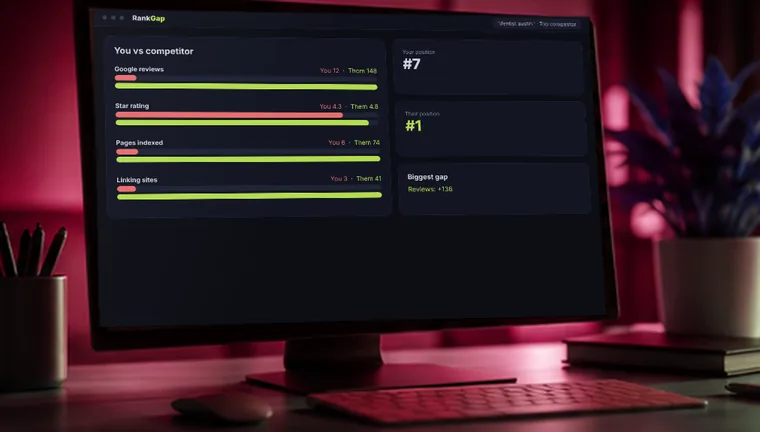
Reviews are where the "trusted" part comes from. A listing with 6 reviews from two years ago will usually lose to one with 60, including some from this month. Ratings matter too, but a steady trickle of new, detailed reviews tends to beat a perfect score with nothing recent.
Ask every happy customer, right after the job, while they're still pleased. Send them the direct review link (it's in your profile) by text. Reply to every review, good or bad, in a normal human voice. Never buy reviews or offer a discount for them. Google removes them, and it can take your whole profile down with them.
6. Your details don't match across the web
If your name is "Smith & Sons Dental" on Google, "Smith and Sons Dentistry" on Yelp, and has an old phone number on a directory from 2019, Google gets unsure which is right. Pick one exact version of your name, address and phone number and use it everywhere. Search your phone number and see what comes up. Fix what's wrong and delete duplicate listings.
7. Your website doesn't back up your listing
Google checks your website to confirm what your profile claims. If the site never mentions your city, your services or your address, that's a weaker signal. Put your name, address and phone on the site as plain text, add a page for each service, and add a page for each area you serve if you cover more than one. Embed your map on the contact page.
8. You're checking from the wrong place
This one confuses people. Map results change with the searcher's location, down to the street. Ranking third for someone across the road from you and not appearing for someone five miles away is normal. Your own searches from your office are also biased, because Google knows you're there and may know you've visited.
Check from a few spots around your area, ideally on a phone with a friend's help, and write down where you show up and where you don't. That tells you where to focus. If you vanish a few miles out, you probably need more reviews and stronger local mentions to extend your reach.
What to do first
If you only have an hour this week: verify the listing, fix your primary category, make sure your name, address and phone match everywhere, and send review requests to your last ten customers. That alone fixes the problem for a surprising number of businesses.
Don't expect overnight movement. Changes to a profile can show up within days, but climbing for competitive searches usually takes weeks to months, mostly because reviews and trust build slowly.
Frequently asked questions
Your website can rank in regular results while your listing is unverified, suspended, or weak. They are separate things, each with its own fixes.
No. The listing and organic map results are free. Local ads are a separate paid option.
There's no magic number. Look at the top results for your search and aim to match or beat them, with a steady flow of new ones.
Get a free local visibility audit
Tell us where to look. A RankNovo strategist reviews your site and replies within 24 hours with what's holding you back and what to fix first. No contract, no pressure.
- Indexing & technical check
- Rankings & competitors
- Fixes in priority order