Google Ads not working? 8 reasons you're wasting spend
The bill keeps arriving and the phone isn't ringing. Almost every case comes down to one of eight problems, and you can check most of them in an afternoon.
By RankNovo Editorial Team
4 min read
Key takeaways
Google Ads rarely fails on its own; the weak link is usually keywords, the landing page or tracking.
Read the search terms report line by line and add negative keywords for searches that will never buy.
Send each ad group to a matching page with the phone number and form visible without scrolling.
Run the numbers first: budget, cost per click and enquiry rate tell you if the plan can ever pay back.
Do the math first
A lot of "it's not working" is really "the numbers never added up." Put in your own figures.
Here's the uncomfortable truth about Google Ads: the platform doesn't fail very often. What fails is the chain around it: the keywords, the ad, the page people land on, and the tracking that tells you what happened. If any link is weak, money leaks out. So don't start by changing your bids. Start by working out which link is broken.
1. Your ads aren't actually running
It sounds silly, but check. Open the campaign and look at the status column. "Limited by budget", "Disapproved", "Under review" or a billing problem will stop or throttle everything. A budget so small it runs out by 9am means you only appear for early searchers, if at all. A paused campaign, an expired card, or a policy disapproval is a five-minute fix that's been costing you weeks.
2. You're bidding on the wrong searches
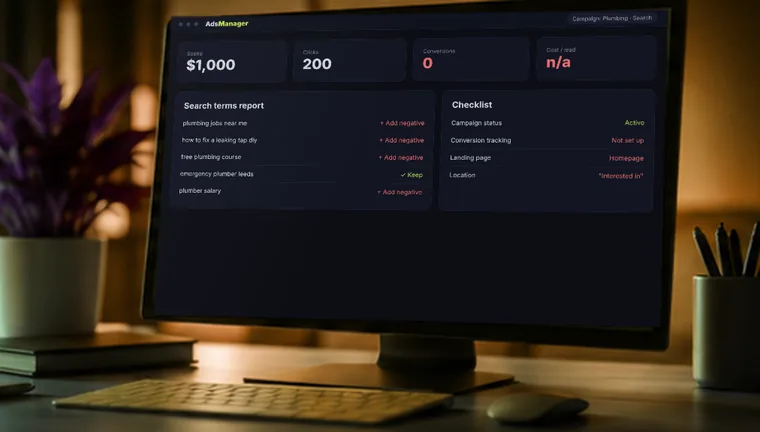
This is the big one. Broad match keywords let Google show your ad for loosely related searches, and that's how a roofer ends up paying for "roofing jobs" and "how to fix a leaking roof". Open the Search terms report, which shows what people actually typed before clicking. Read it line by line. You'll usually find a pile of clicks that were never going to become customers.
Add those as negative keywords (jobs, free, DIY, salary, course and anything else that doesn't match what you sell). Then move your main keywords to phrase or exact match until you've got clean data.
3. You're getting clicks, but your page doesn't deserve them
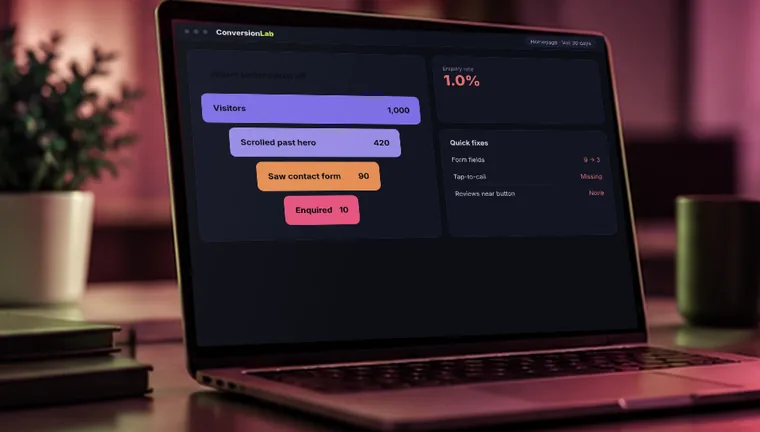
A lot of ad accounts that look broken are really landing page problems. The visitor clicked "emergency boiler repair" and arrived on your homepage with a slideshow and a menu of eleven services. They left.
Send each ad group to a page that talks about exactly that thing. Put the phone number and the form where they can see it without scrolling. Make sure it loads fast on a phone, because that's where most of your clicks are coming from. One clear action per page beats five options.
4. Nobody is measuring what happens after the click
If conversion tracking isn't set up, Google can't tell a good click from a bad one, and neither can you. You'd be spending without knowing whether any of it worked. Check under Goals, then Conversions. You want form submissions, phone calls from the ad, and calls or clicks on your phone number to be counted, and nothing else (page views as "conversions" make the numbers look great and mean nothing).
Test it yourself. Submit your own form, then see if it shows up.
5. Your location and schedule settings are off
There's a default setting that shows your ads to people "in or interested in" your target area. For a local business, that can include people searching from the other side of the country about your town. Switch to people physically in your area. Also check the ad schedule. If nobody answers the phone after 6pm, there's little point paying for clicks at 9pm.
6. The ad itself doesn't make anyone click
If you get lots of impressions and almost no clicks, your ad is the problem. Weak ads say what everyone says: "Quality service at great prices." Strong ones say something specific. Include what you do, where, and one reason to choose you: same-day appointments, fixed prices, open Saturdays, a guarantee you actually honour. Use the keyword in the headline, so it matches what the person typed.
7. You gave the algorithm the keys too early
Automated campaign types and smart bidding can work well, but they need data to learn from. On a new account with a small budget and no tracked conversions, they're basically guessing with your money. Google also tends to nudge you toward them with "recommendations", and accepting all of them can quietly widen your targeting and raise your budget.
Start simple. Run a tight search campaign, collect a few weeks of real conversion data, and then let automation take over where it has something to learn from.
8. The numbers were never going to work
Go back to the calculator. If a click costs $8, only 3 in 100 visitors enquire, and you need a customer worth at least $400 to break even, you can see right away whether the budget is realistic. A very small budget in a high-cost market often can't buy enough clicks to produce a single lead, no matter how well it's run.
If the math is the issue, the answer isn't to tweak ads. It's to improve the conversion rate with a better page, narrow to the most profitable searches, pick a less competitive area, or add other channels like local SEO, which has no cost per click.
What to check first
In this order: campaign status and billing, the search terms report, your landing page, then conversion tracking. Give any change a couple of weeks before you judge it, because changing everything daily means you never learn which change helped.
Frequently asked questions
You should see impressions and clicks within days. Reliable lead numbers usually take a few weeks of data and adjustments.
It depends on your cost per click and your customer value. Do the math above and make sure the budget can buy enough clicks to generate a few leads a month.
They do different jobs. Ads are fast but stop when you stop paying. SEO builds slowly and keeps working. Many businesses use both.
Free website audit
Get a free ads and landing page review
Tell us where to look. A RankNovo strategist reviews your site and replies within 24 hours with what's holding you back and what to fix first. No contract, no pressure.
A 15-point review of your rankings, site speed, AI search visibility and quick wins, delivered to your inbox within 24 hours.
We value your privacy. We use cookies to understand how visitors use our site and to improve our marketing. You can accept or reject them; the site works either way. Privacy Policy